Touch panel builder for the RELO IO8 · coming soon
Your own touch panel.
Design the control screen your client actually uses. Drop buttons, faders and live feedback onto pages in Cueva Desktop, upload it to the RELO IO8, and run it on any iPad, iPhone or Android device.

- 14
- Components
- 4
- Button modes
- 2
- Layouts, tablet and phone
- Live
- Device feedback
How it works
Design, upload, tap.
The interface lives on the controller, not on a server. Screens connect to it over the local network and stay in sync with whatever you upload last.
Step 1
Design it in Cueva Desktop
Interface builder sits next to device control in the same app. Drop components onto pages, set the look, and wire each control to a relay, a flow or a node.
Step 2
Upload it to the RELO IO8
One click sends the interface to the controller on your local network. The controller stores it, so there is no server or cloud account in between.
Step 3
Open it on any tablet or phone
The Cueva Interface app for iOS and Android finds the controller on the network and loads the interface. Upload a new version and every connected screen reloads it.
Features
Everything in the builder.
Components
- Buttons: one press, toggle, momentary, dual actionOne press fires once, toggle stays on, momentary runs while held, and dual action does one thing on a tap and another on a long press.
- Button groupsA row or column of options where one is selected, each with its own actions. Made for sources and modes.
- FadersMin, max, step and a default value. Sends its value to an automation node while you slide.
- Labels and live dynamic labelsStatic text, or text that shows a live value from the device in your own format and wording.
- Colour spectrum and colour wheelPick any colour and output RGB or RGBW, or limit the choice to a palette of your own colours.
- Visual meters with dBFS and VU scalesHorizontal or vertical level meters with colour zones and scales for dBFS, VU, K-20, percentage or your own.
- RTSP video feedsLive camera streams on the panel, with tap for full screen. UniFi Protect links work as they are.
- Images, icons and shapesUpload logos and floor plans, pick from the Feather and Ionicons sets, and draw panels and backgrounds.
- Groups that scroll, hide and lockGroup components into a card that can scroll, and show, hide or lock as one unit.
- PIN and password loginA keypad for a login page, so the interface only opens after the right PIN or password.
Dynamic styling
- Style rules on live device stateChange colour, text, border, font size or opacity when a condition on the device is true.
- Show or hide on conditionsControls only appear when they matter, based on a relay, input, fader, node or the signed in user.
- Blink and pulseAnimate a control while a rule matches, so an alarm or a muted mic is hard to miss.
- And/or conditions with priorityCombine conditions with and or or, and set which rule wins when more than one matches.
- Toggles follow the real relay stateIf a relay is switched from somewhere else, a toggle wired to it still shows the actual state.
- Live text from relays, inputs, nodes and systemShow relay and input states, fader and node values, uptime, device name, IP address and firmware.
Layout and navigation
- Separate tablet and phone layoutsEvery page has a tablet and a phone version, each placed to the pixel for its screen.
- Phone page from a tablet page in one clickThe builder lays out a phone version of a tablet page for you to refine.
- Sync from tablet, keeps your phone layoutCopies text, actions and bindings from the tablet page and leaves the phone positions you set by hand alone.
- iPad, iPhone, Samsung and custom sizesPresets for common tablets and phones, or set your own width and height.
- Tab bars on any edge, docked or floatingTop, bottom, left or right, with icons, text or both, and shown only on the pages you pick.
- Home, screensaver and login pagesMark a home page, start a screensaver after a timeout, and lead from it to a login page.
Design tools
- Theme presetsStart from Cueva Control, Ocean, Minimal or Red for the colours, radius and font size of new components.
- Colour variablesName a colour once and link fields to it. Change the variable and every linked control follows.
- Snap to grid and safe area guidesA 10 pixel grid, and guides that keep controls clear of rounded corners and camera cut-outs.
- Align and distributeLine up several components and space them evenly in one click.
- Copy and paste styleTake the styling of one component and apply it to others.
- Undo, redo and keyboard shortcutsUndo, redo, copy, paste, group and nudge with the shortcuts you already know.
Control
- Relays on, off, toggle and pulseSwitch any relay on the RELO IO8 on or off, toggle it or give it a pulse.
- Run automation flowsStart a flow from the Cueva Desktop flow editor, which can then reach any device it controls.
- Fire automation nodesTrigger a single node in a flow, including a specific input on firmware 1.4 and later.
- Faders and colours sent to nodesFaders and colour pickers stream their value to the node they are bound to.
- Page navigationGo to a page, go back or go home from any button.
- Several actions on one pressOne press can switch relays, run a flow and change page at the same time.
Access and deploy
- Users, roles and pages per userAdmin, user and custom roles, with each page visible to everyone or only to specific users.
- PIN lock on any controlPut a 4 to 8 digit PIN on a control or group to stop accidental presses.
- Live preview against the deviceRun the interface inside the builder against the connected RELO IO8, with real states and real actions.
- Issue checker before you uploadFlags buttons without actions, broken links, unlinked controls and targets too small to tap.
- One-click upload to the RELO IO8Send the interface to the controller on your network. Images are resized on the way.
- Connected screens reload automaticallyEvery connected iPad, iPhone or Android screen picks up the new version by itself.
- Import and export designsSave designs as files and reuse them on other projects.
- AI agent over MCPLet Claude Desktop, Claude Code or another MCP client build pages in the open builder, locally.
AI agent
Describe the panel. Watch it build itself.
Cueva Desktop has a built-in MCP server, so Claude Desktop, Claude Code and other MCP clients can design in the open builder. Everything runs locally on your computer, every change lands on the canvas as it happens, and nothing reaches the device until you confirm the upload.
New chat
Claude, connected to Cueva Desktop
What are we building today?
Describe a page and Claude builds it in the open interface builder.
Reply to Claude…
Forty builder tools
Pages, components, layout, theme and tab bars.
It knows your device
Controls are wired to nodes that really exist.
Local, and you decide
Undo anything with ⌘Z. Only you can upload.
Components
Fourteen building blocks.
Controls, live readouts, media and layout pieces. Every one can be rotated, styled, hidden on a condition or locked behind a PIN.
Button
One press, toggle, momentary (hold to run) or dual action with a separate long press. A toggle on a relay follows the relay’s real state.
Button group
A segmented selector. Each option carries its own actions, laid out horizontally or vertically.
Fader
A slider with min, max, step and default. It sends its value to an automation node, both raw and scaled 0 to 1.
Label
Static text with its own size, weight, colour, alignment and background.
Dynamic label
Live text from the device: relay and input states, fader values, node values, uptime, device name, IP and firmware.
Color spectrum
A colour picker that outputs RGB or RGBW, or a custom palette of 4 to 12 colours, sent to a colour node.
Color wheel
A colour ring in full spectrum, eight colours, or a palette of your own.
Visual meter
A level meter with colour zones and scale presets for dBFS, VU, K-20, percentage or a custom scale.
Video feed
A live RTSP camera stream, with tap for full screen. UniFi Protect links are handled for you.
Image
Your own logos and floor plans, stored inside the interface and resized on upload.
Icon
Feather and Ionicons sets, at any size and colour.
Rectangle
Shapes and background panels to group controls visually.
Group
Group components into a card that can scroll, hide and lock as one unit.
Authentication
A PIN or password keypad for a login page in front of the interface.
Actions
Behind every button, a flow.
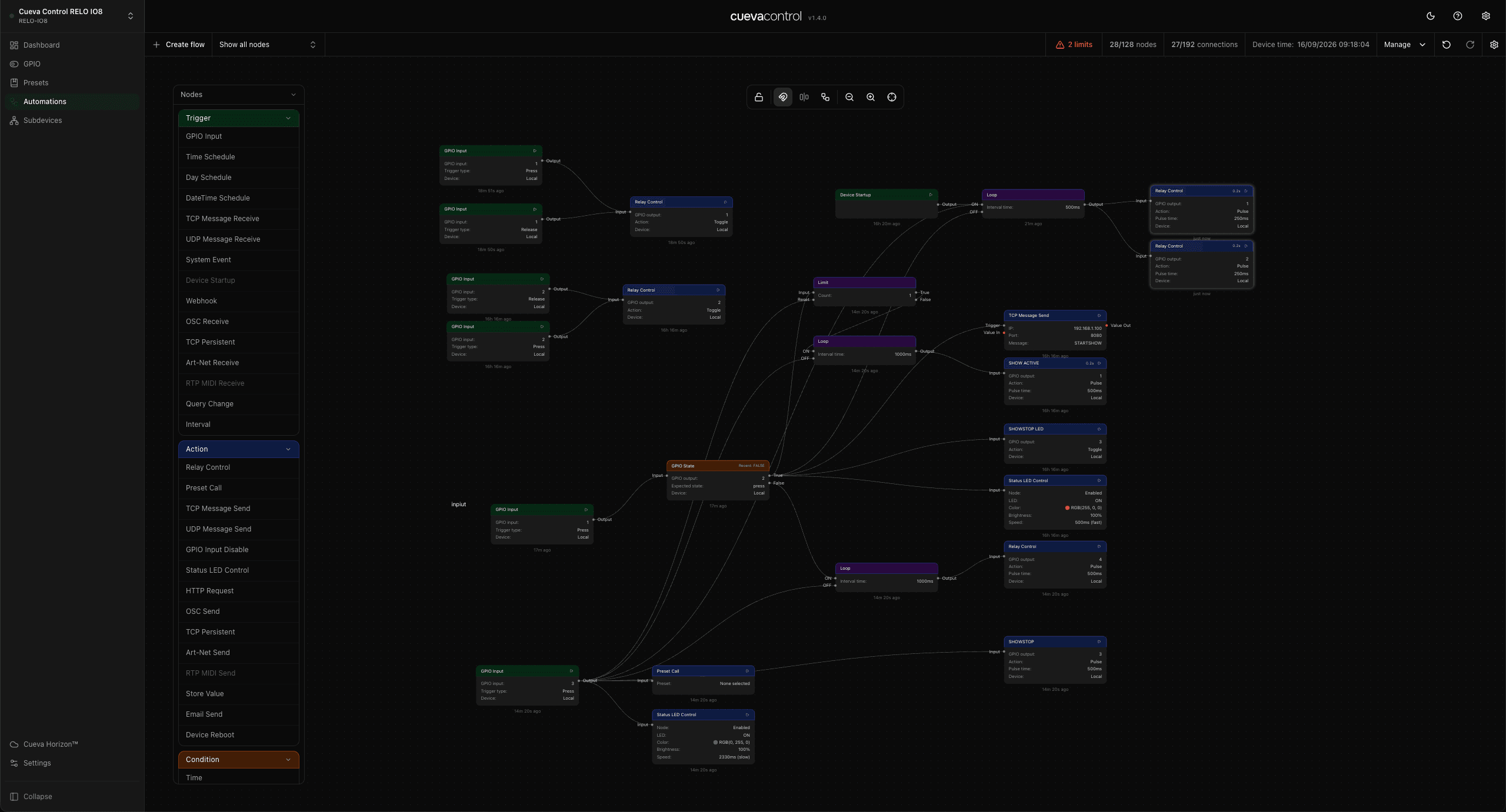
A press switches a relay, runs a flow or fires a node you built in the automations editor. The flow does the rest, so one button can reach a projector, a mixer or a lighting desk.
- Switch a relay on, off, toggle it or pulse it
- Run an automation flow you built in the flow editor
- Fire a specific automation node
- Show, hide or toggle another component
- Go to a page, go back or go home
- Several actions on one press, fired together
Feedback
The screen shows what the room is doing.
Style rules
Colour, text or opacity follow the live state.
Blink and pulse
Draw the eye to what needs attention.
Show or hide
By relay, input, fader, node or user.
Conditions
Combine with and/or, with a priority per rule.
Editor
Built for the people who install it.
Snap, align, distribute
Grid, safe area guides and nudge keys.
Shortcuts you know
Undo, redo, copy, paste, group.
Themes and colour variables
Change one colour, every control follows.
Tab bars
On any edge, icons, text or both.
Live preview
Test against the connected controller.
Issue checker
Catch it before you are on site.
Tablet and phone
One project, every screen size.
Phone from tablet
Generate the phone page in one click.
Sync from tablet
Keeps the phone layout you placed by hand.
Size presets
iPad, iPhone, Samsung or a custom size.
Access
The right controls for the right person.
Users and roles
Admin, user and your own roles.
Pages per user
Guests never see the service page.
PIN lock
Stops accidental presses on any control.
Waitlist
The builder is not out yet.
It is in testing now. The waitlist hears first when it opens up.
Join the interface builder waitlist
One email when it is ready. No spam.
Questions
The things people ask first.
It is in testing now and coming to Cueva Desktop for the RELO IO8. Join the waitlist on this page and you hear first when it opens up.
Any iPad, iPhone or Android phone or tablet with the Cueva Interface app. The app picks the tablet or phone layout based on the screen size.
No. The interface is stored on the RELO IO8 and the app talks to the controller over your local network. The screen does need to be on the same network as the controller.
Yes, through an automation flow. A button runs a flow or fires a node, and the flow sends the TCP, UDP, OSC or other command to the equipment. The interface itself only talks to the RELO IO8.
Yes. Cueva Desktop includes a local MCP server, so Claude Desktop, Claude Code and other MCP clients can create pages, add components and wire them to the nodes on your RELO IO8. You watch it happen on the canvas, can undo every step, and confirm the upload yourself.
Yes. The interface is uploaded to and served by the RELO IO8, and every control acts on that controller or the flows running on it.
Yes. Pages can be limited to specific device users, and controls can sit behind a PIN. The PIN is meant to stop accidental presses, not as a replacement for network security.
A panel that matches the room.
The interface builder is coming to Cueva Desktop. Until then, build the logic it will control.